Mastering the art of coupon management

MASTERING THE ART OF DISCOUNTING & COUPON MANAGEMENT
Offering Discount on your products is a great way to keep your customers coming back to your store. As a store owner on Vendorfy, you have the ability to create and offer discount/coupons on a specific product or all products on your store and these discounts/coupons can only be applied to the products on store. You can set the time duration, Usage Limits, Expire date, Minimum Amount, Specific product(s) and restrictions for the coupon.
We provide a comprehensive coupon management system for our store owners to help them maximize sales and profit. Store owners can create as much coupons as they want depending on their needs.
Beware of Under-pricing: Only you can decide the price of your products when offering discounts, ensure you do not over use or offer too many discounts at all time. If you continue to lower your price irrationally, customers may think something is wrong with your products.
In this article, I will show you all you need to know when creating a coupon from your Vendorfy Store Management Dashboard.
How to Create Coupons:
Creating coupons from your management dashboard is pretty easy and straight forward although if it’s your first time you may make some mistakes but am sure when you try it a couple of times you will quickly understand how it works.
By follow the instructions below you will quickly master the art of creating a winning coupon for your vendorfy store.
Log in to your management dashboard, Click on the -> COUPONS TAB, Click on -> ADD NEW COUPON at the top right side of the page.

When creating a coupon from your dashboard, there are some elements you need to understand:
There are 2 sections you have to fill to correctly create a coupon from your management dashboard.
SECTION ONE
- Code: This is your COUPON CODE eg. (BLACKFRIDAY) ensure no space when typing the title and must be in UPPER CASE, you can choose to use only alphabets or mix of Alphabets and Numbers.
NOTE: You can customize your coupon code to suite your need.
- Description: This can be a short description or instruction for the coupon example. (Get ₦2000 Naira discount when you buy any product from my store)
- Discount Type: This can be in percentage or a flat amount.
- Coupon Amount: This is the amount or percentage of the coupon eg. (2000 for amount or 10 for percent DO NOT include the percentage sign or currency sign)
- Expire Date: You can specify when you want the coupon to expire (this is a very useful tool to create a sign of urgency for your customers to quickly take action).
- Show on Store: Always check the box to enable coupon appear on your store page.
- Allow Free Shipping: You can uncheck this if you don’t want to apply free shipping to the coupon.

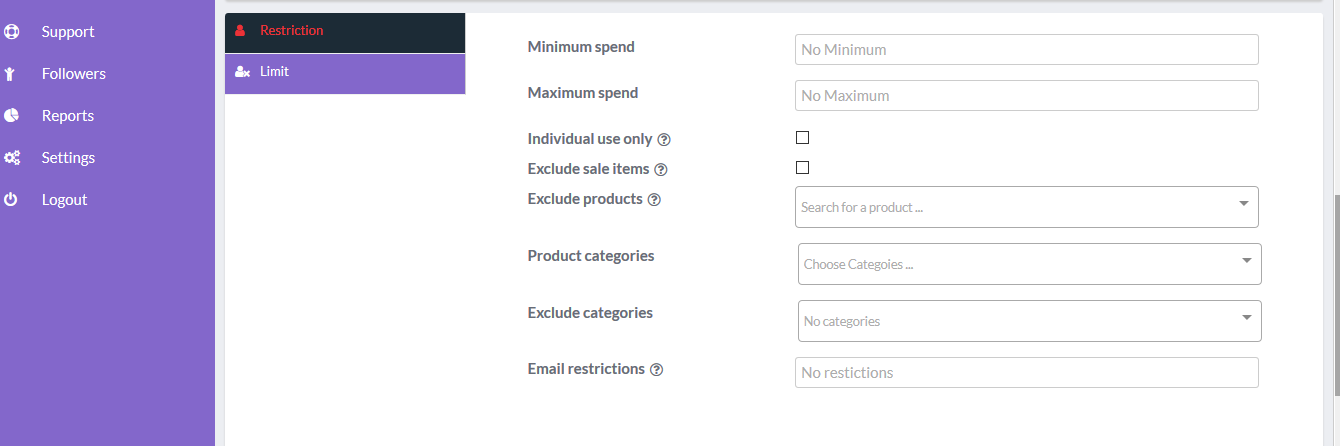
SECTION TWO (RESTRICTION)
- Minimum Spend: You can set a minimum amount to be spent purchase before the coupon can be used when checking out.(i.e: if you set ₦50,000, the customer must purchase items from your store that is worth ₦50,000 and above before they can use the coupon).
- Maximum Spend: You can set a maximum amount to be spent on a purchase before the coupon can be used when checking out. For best practice, it is advised to leave this field empty or else you need this functionality for a special purpose.
- Individual use only: Check the box if you don’t want the coupon be used along aside any other coupon (i.e if you have multiple coupon codes for your store, you can restrict your customers to only use one coupon at a time).
- Exclude sale items: Check the box if you don’t want the coupon to be used on items on sales (i.e if you already have some items on your store that’s on sales, if this box is checked, customers won’t be able to use the coupon for the item).
- Exclude Products: You can exclude some products on your store from being eligible for the coupon.
- Product Category: You can set a product category that this coupon can apply to (i.e if you sell items on different categories such as FASHION or ELECTRONICS, you can set the coupon to only apply to all products on FASHION by selecting the category from the box. Once this is done the coupon code can only be used for products on the selected category.
- Exclude categories: You can exclude any category of products present on your store from being eligible for this coupon.
- Email Restrictions: Here you can input any email you want to restrict from using the coupon (i.e it could be a staff email or any email you don’t want to make use of this coupon).
- Exclude Sale Items: You can check the box if you do not want coupon to work for items that are already on sales discount in your store.
SECTION TWO (LIMITS)
- Usage Limit Coupon: Here you can provide a limit of use for the coupon eg. If you want the coupon to be used only 10 times just TYPE (10). When the usage has being exhausted, the coupon code will become invalid for subsequent use.
- Limit usage to X items: You can set the number of time this coupon can be used for a particular item. (i.e if you set number as 1, the coupon can only be used once for each item. For best practice we advise you leave this section blank).
- Usage limit per user: you can set how many times this coupon can be used by an individual (i.e if you set the number as 1, when a particular customer used the coupon on his previous purchase, he won’t be able to make use of it again for subsequent purchase).
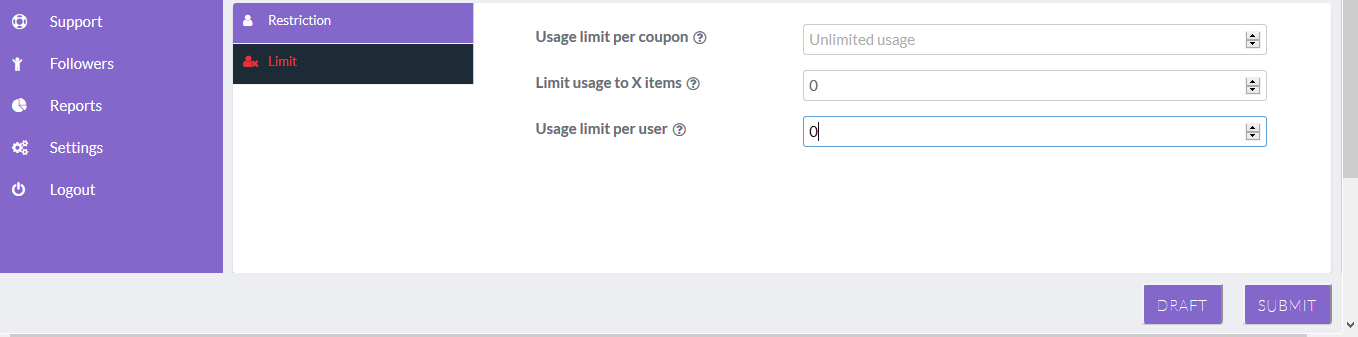
When you are done, review all your inputs and click on SUBMIT. The coupon will automatically appear on your store page.
NOTE: To maximize the use and potentials of coupon to increase sales, you can copy the generated coupon code and paste it when writing content about your products on your entire social media page coupled with your store url link.
You can also increase awareness for the coupon by make uses of our in-built marketing tools where you can send mass email or push notifications to all your store subscribers and previous customers.
Click Here To Learn How to Promote Your Store.

Adetola Adele is the head team leader at Vendorfy a subsidiary of GoPanta Media. He is a highly motivated, entrepreneurial minded and result oriented self starter with the focus on Ecommerce as the next big thing in Africa.